About Temporal SDKs
A Temporal SDK (software development kit) is the open-source library you add to your application to use Temporal.
It provides everything needed to build Workflows, Activities, and other Temporal features in a specific programming language including APIs to configure a Temporal Client, develop your Temporal Application, and run Workers you can scale out as your load grows.
Temporal Applications
Developers create Temporal Applications using an official Temporal SDK.
A Temporal Application is the code you write, comprised of Workflow Definitions, Activity Definitions, code used to configure Temporal Clients, and code used to configure and start Workers.
Consider that the Workflow Definition code can be executed repeatedly. The Temporal Platform can concurrently support millions to billions of Workflow Executions, each of which representing an invoked Workflow Definition. A Temporal Application can run for seconds or years in the presence of arbitrary load and failures.
Official SDKs
What are the officially supported SDKs?
Each Temporal SDK targets a specific programming language.
Third-party SDKs
The following third-party SDKs exist but are not officially supported by Temporal:
- Swift from @Swift Community
- Haskell from @MercuryTechnologies
- Clojure from @Manetu
- Scala from @vitaliihonta
Why use a Temporal SDK?
Temporal SDKs empower developers to concentrate on creating dependable and scalable business logic, alleviating the need to build home-grown supervisor systems to ensure reliability and fault-tolerance. This is possible because the Temporal SDK provides a unified library that abstracts the intricacies of how Temporal handles distributed systems.
SDKs are more than a development toolkit. The APIs encourage a code pattern that mirrors real-world processes, and the SDK's internal implementation, working with the Temporal Service, steps through that code at runtime to guarantee execution progression.
Development pattern
By abstracting complexities and streamlining boilerplate code, developers can craft straightforward code that directly aligns with their business logic, enhancing code readability and bolstering developer productivity.
Consider a bank loan application. Developers can design the business logic of a bank loan using the Temporal SDK. The Workflow defines the overarching business logic, encompassing tasks such as validating applicant information, credit checks, loan approval, and applicant notifications, as Activities.
The following is pseudocode. For tested samples see your language SDK's developer's guide.
func LoanApplicationWorkflow {

    sdk.ExecuteActivity(CreditCheck)

    sdk.ExecuteActivity(AutomatedApproval)

    sdk.ExecuteActivity(NotifyApplicant)

    // ...
}
For instance, Temporal SDKs have built-in support for handling failures, timeouts, and retries. In the event of an Activity failure, the SDK automatically initiates retries according to configurable policies established by the developer within the SDK. This streamlined process simplifies the integration of fault-tolerance mechanisms into applications.
Replays
Another quality of the SDKs lies in their ability to replay Workflow Executions, a complex operation that contributes significantly to the Platform's promised reliability.
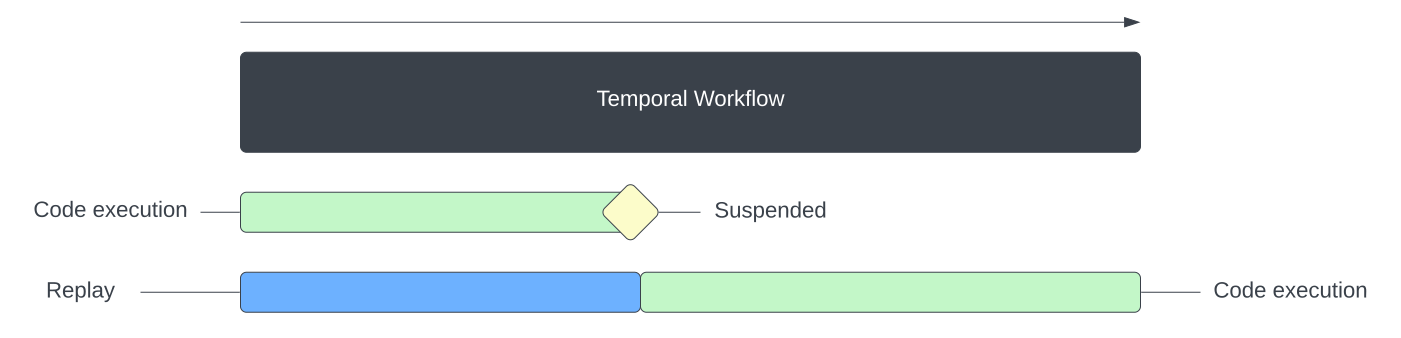
The SDKs Replay code execution to continue from the last step
We will delve into this idea more later, but for now, it signifies that the SDKs can automatically continue a process from the point of interruption, should a failure occur. This capability stems from the SDK's ability to persist each step the program takes.
Temporal SDKs major components
What are the major components of Temporal SDKs?
Temporal SDKs offer developers the following:
- A Temporal Client to communicate with a Temporal Service
- APIs to develop application code (Workflows & Activities)
- APIs to configure and run Workers
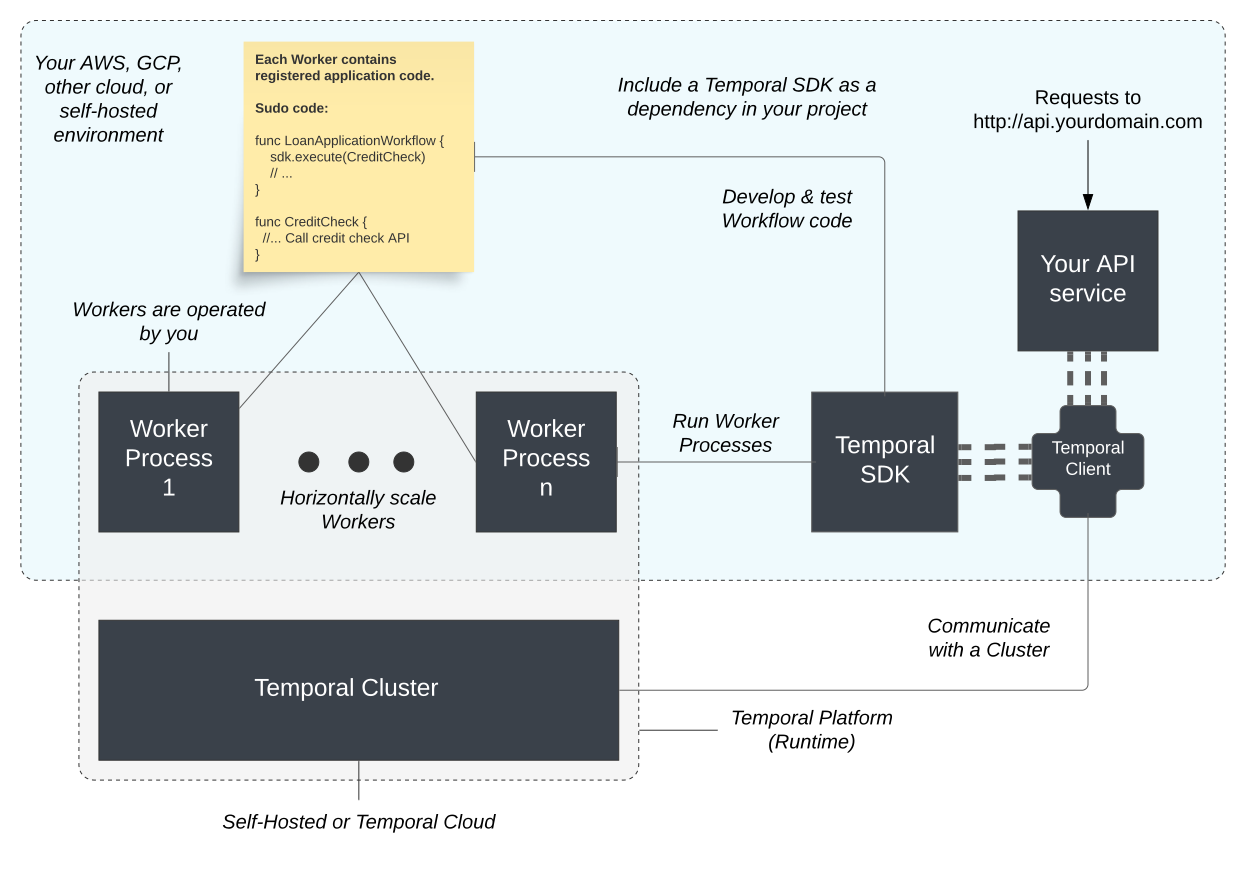
Temporal SDK components create a runtime across your environment and a Temporal Service
Let's break down each one.
Temporal Client
A Temporal Client acts as the bridge for communication between your applications and the Temporal Service. The Client performs key functions that facilitate the execution of, management of, and communication with Workflows.
The most common operations that a Temporal Client enables you to perform are the following:
- Get the result of Workflow Execution.
- List Workflow Executions.
- Query a Workflow Execution.
- Signal a Workflow Execution.
- Start a Workflow Execution.
Developers use the Client as the main entry point for interacting with the application through Temporal, for example, to start or Signal Workflows, Query a Workflow's state, or get a Workflow result.
APIs to Develop Workflows
Workflows are defined as code: either a function or an object method, depending on the language.
The Workflow code uses Temporal SDK APIs to orchestrate the steps of the application.
A Workflow executes Activities (other functions that interact with external systems), handles and sends messages (Queries, Signals, Updates), and interacts with other Workflows.
This Workflow code, while executing, can be paused, resumed, and migrated across physical machines without losing state.
When a Workflow calls the API to execute an Activity, the Worker sends a Command back to the Temporal Service. The Temporal Service creates Activity Tasks in response which the same or a different Worker can then pick up and begin executing. In this way, the Worker and Temporal Service work together to incrementally execute Workflow code in a reliable way. We discuss this more in the expandable section below.
The SDK APIs also enable developers to write code that more genuinely maps to their process. This is because without a specialized SDK, developers might have to write a lot of boilerplate code. This can lead to code that's hard to maintain, difficult to understand, or that doesn't directly correspond to the underlying business process.
The level of abstraction that APIs offer enables the developer to focus on business logic without having to worry about the intricacies of distributed computing such as retries, or having to explicitly maintain a state machine and the intermediate state for each step of the process.
Additionally, the state of the Workflow is automatically persisted so if a failure does occur, it resumes right where it left off.
APIs to create and manage Worker Processes
Workers are responsible for executing Workflow and Activity code (application code). The SDK provides APIs for configuring and starting Workers, enabling developers to control how the code is executed. Workers are horizontally scalable, often run with systems like Kubernetes, and configured according to the application's needs.
The Worker polls on the specified Task Queue, processing those Tasks, and reporting the results back to the Temporal Service. They execute both the Workflows and Activities, and the SDK ensures that they perform these tasks efficiently and reliably.
APIs to customize Activity Execution behavior
Activities in Temporal are individual units of work that often represent non-deterministic parts of the code logic, such as querying a database or calling an external service. The SDK provides APIs to customize the behavior of an Activity Execution.
By default, if an Activity attempts to communicate with another system and encounters a transient failure like a network issue, Temporal ensures the Activity is tried again automatically.
However, Temporal enables developers to control a variety of timeouts, a Retry Policy, Heartbeat monitoring, and asynchronous completion.
How SDKs work with the Temporal Service
The section below explains how your Client, Workers, and the Temporal Service work together when you run Workflow and Activity code.
How do the Temporal SDKs work with the Temporal Service?
The Temporal Service functions more as a choreographer than a conductor. Rather than directly assigning tasks to Workers, the Temporal Service arranges the Tasks into a Task Queue while Workers poll the Task Queue. Developers may create a fleet of Workers and tune them so that a Task is picked up as soon as it is available. If a Worker goes down, Tasks can wait until the next Worker is available.
A Workflow might request to execute an Activity, start a Timer, or start a Child Workflow, each of which translates into a Command, dispatched to the Temporal Service. In addition to acting on these Commands, the Temporal Service documents that interaction by appending their corresponding Events into the Workflow Execution's Event History.
Take for instance the call to execute an Activity. When a Workflow invokes it, the Worker doesn't immediately execute that Activity code. Instead, it generates a ScheduleActivityTask Command, dispatching it to the Temporal Service. In response, the Temporal Service queues up a new Activity Task. Only when a Worker finds itself free, it collects the task and begins executing the Activity code.
The Temporal Service persists Workflow Execution Event History, so that if there is a failure, the SDK Worker is able to Replay the execution and resume where it left off.
This is where the deterministic constraints of the Workflow code comes into play, requiring the use of Activities to create side effects and interact with the outside world.
Activities perform work outside the Workflow, for example, calling an external API. Since the call can fail due to transient issues, you define it as an Activity and configure retry options in your SDK.
When you create a new Worker process, the Worker creates a long-lasting connection to the Temporal Service, polling a Task Queue for Tasks that are related to the code it is capable of executing.
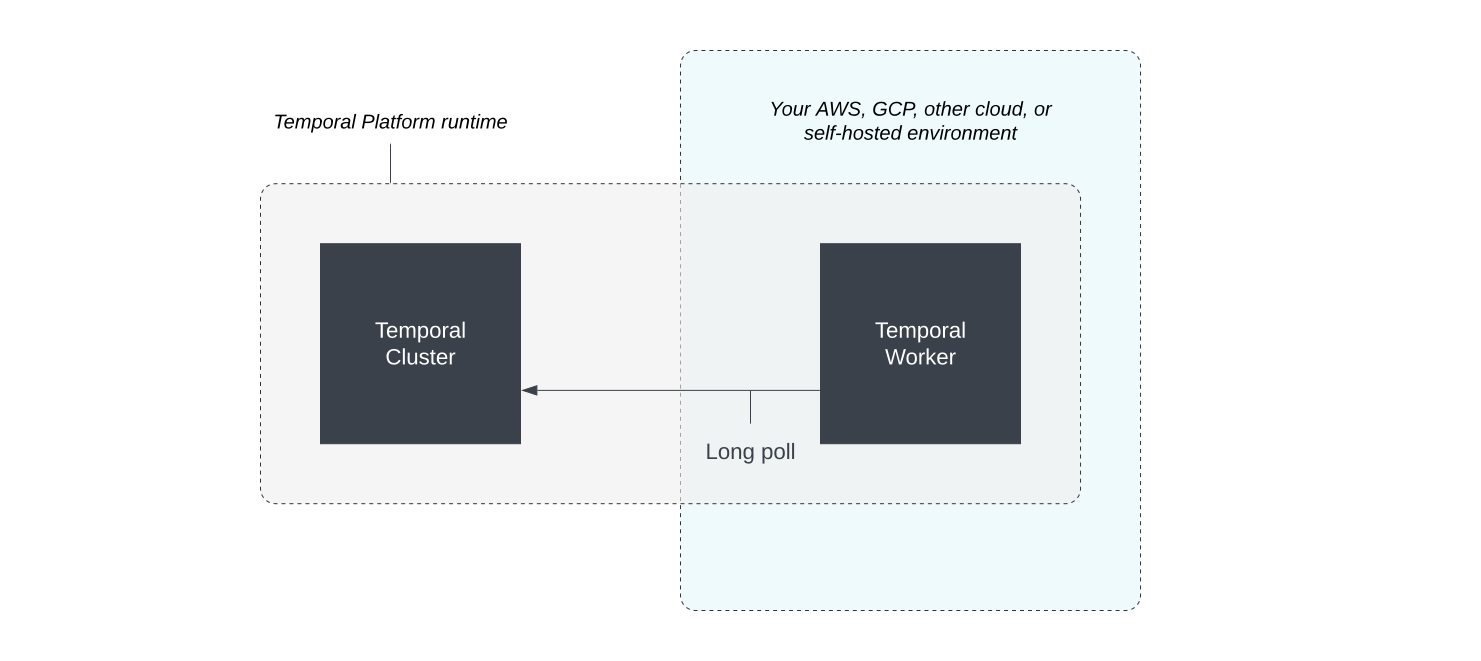
A Worker long polls for Tasks
Although the Worker is now running, unless a Workflow is explicitly started, the Task Queue doesn't have any Tasks on it and so, no code executes. We can use a Temporal Client (available in Temporal SDKs and the Temporal CLI) to start a new Workflow.
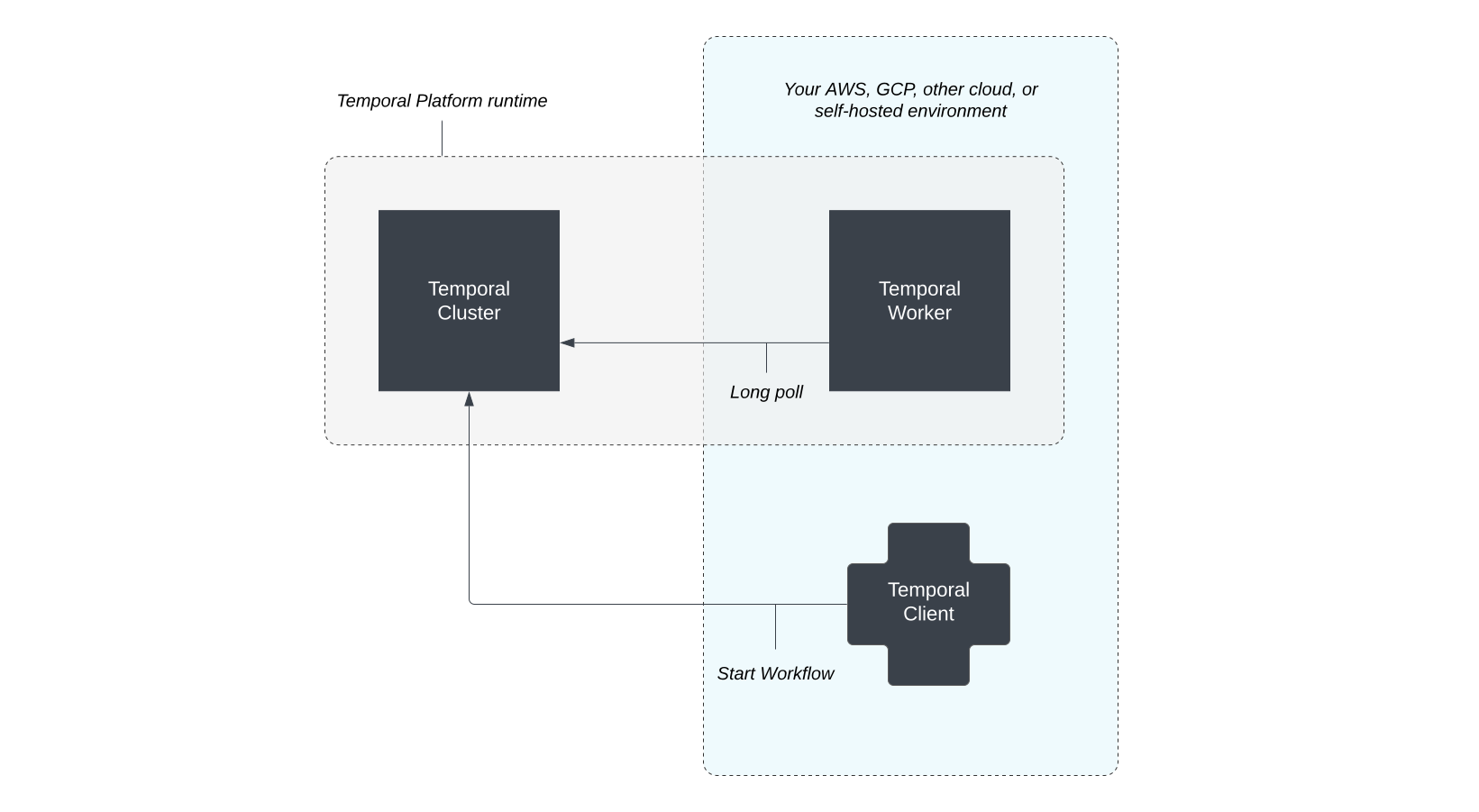
Start a Workflow using a Temporal Client
Starting a Workflow Execution creates a new Event, WorkflowExecutionStarted, and adds it to the Workflow Execution's Event History.
The Temporal Service then schedules a Workflow Task by adding it to the Task Queue. When the Worker has capacity, it picks up this Task, and begin executing code.
Each step of the Task (e.g. Scheduled, Started, and Completed), gets recorded into the Event History.
- Scheduled means that the Temporal Service has added a Task to the Task Queue.
- Started means that the Worker has dequeued the Task.
- Completed means that the Worker finished executing the Task by responding to the Temporal Service.
When the call to invoke the Activity is evaluated, the Worker suspends executing the code and sends a Command to the Temporal Service to schedule an Activity Task.
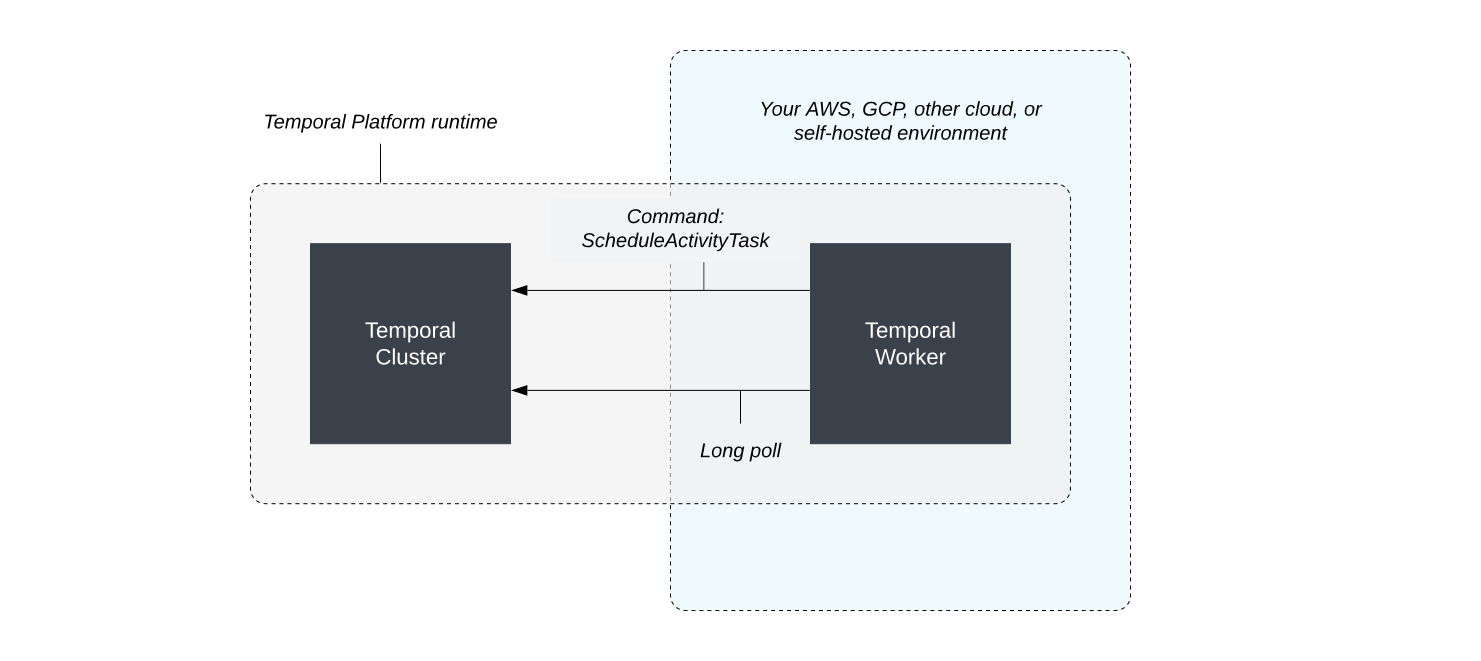
Worker suspends code execution and sends a Command to the Temporal Service
When the Worker process can perform more work, it picks up the Activity Task and begins executing the Activity code, which includes the call to the external API.
If the Activity fails, say the API goes down, Temporal will automatically retry the Activity with one second between intervals, as the configurations have defined, an infinite number of times until the Activity succeeds or is canceled.
In the case where the calls succeeds, and the code completes, the Worker tells the Temporal Service the Activity Task completed.
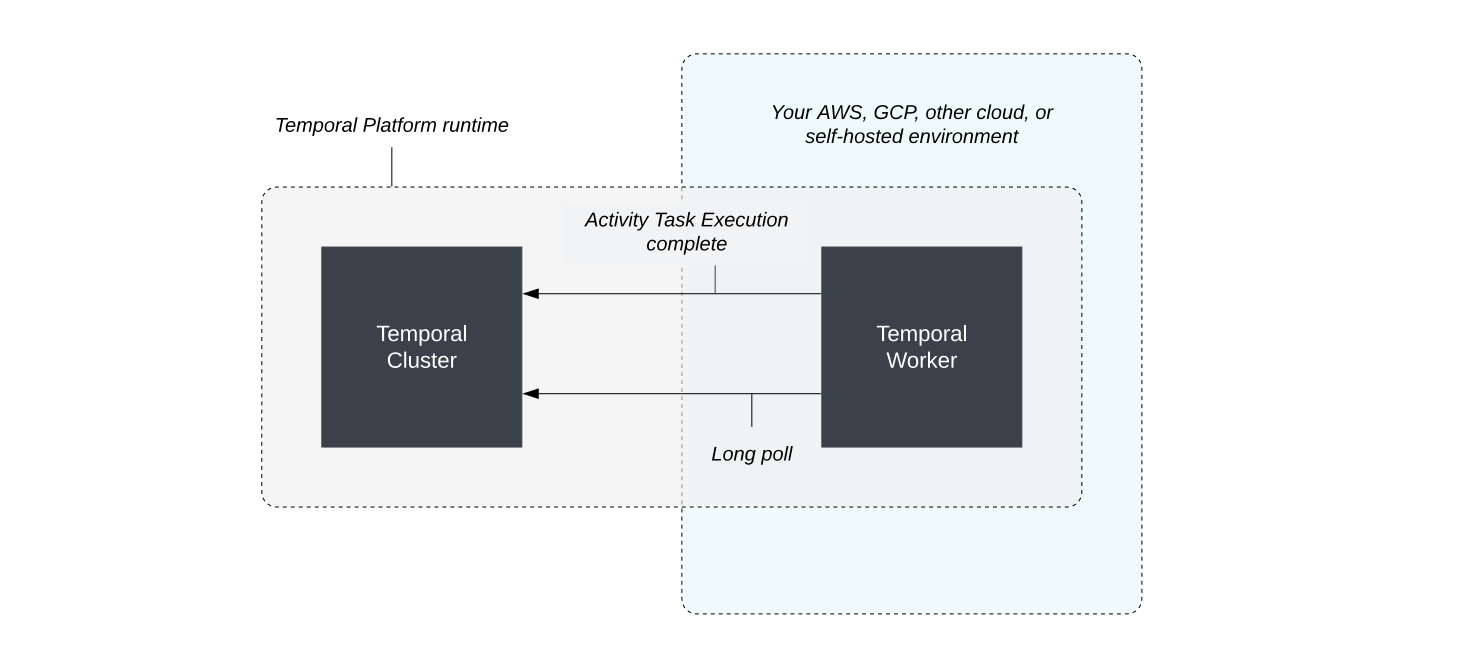
The Worker reports that the Activity Execution completed
Included is any data that was returned from the Activity (results of the API call), which is then persisted in the Workflow Execution Event History, and is now accessible to the Workflow code.
The Temporal Service creates a new Workflow Task which the Worker picks up.
The Worker picks up the new Task
This is when the SDK Worker Replays the Workflow code, using the Event History as guidance on what to expect. If the Replay encounters an Event that doesn't match up with what is expected from the code, a non-determinism error gets thrown.
If there is alignment, the Worker continues evaluating code.
Assuming the Activity Execution is successful, the Workflow now has the result of the Activity and the Worker is able to finish evaluating and executing the Workflow code, responding to the Temporal Service when complete.
The result of the Workflow can now be retrieved using a Temporal Client.
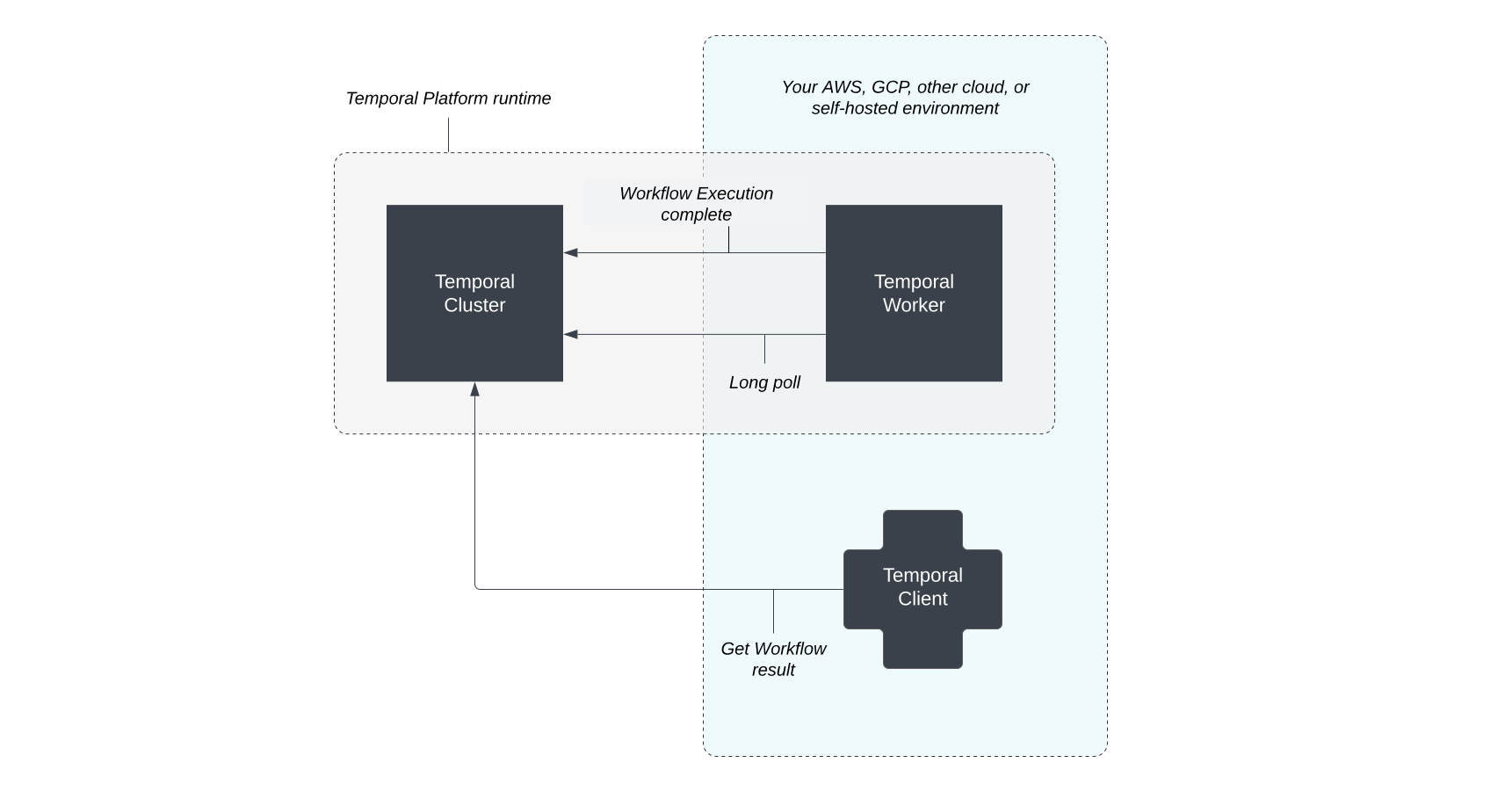
The Temporal Client can now access the result of the Workflow
And that’s how a Temporal Worker and Temporal Service work together.